



Even a well-established Policy Administration System (PAS) can drift away from how work actually gets done. Over time, teams create workarounds, rely on spreadsheets, manage approvals through email, and add manual steps just to keep policies moving. Nothing may look obviously broken, but the impact builds quietly: endorsements slow down, document errors increase, service teams face delays, and compliance risks become harder to spot.
For U.S. P&C insurers, auditing the policy administration process is not just an operational review, it is a practical way to reduce cost, improve turnaround time, and strengthen compliance. As products evolve, workflows grow more complex, and state filing requirements change, carriers need a clear view of where process breakdowns are happening and what should be fixed first.
You do not need to start with an outside consultant or a full system overhaul. With the right scope, a simple audit framework, and a focus on real transaction flows, your team can identify inefficiencies, uncover hidden risks, and prioritize improvements using the systems you already have.
Content Overview
What Is a Policy Administration System (PAS) and What Does It Include?
When insurers think about policy administration, they often default to the PAS itself. But a true audit needs to widen the lens. The “policy admin process” is the full set of systems, people, workflows, and artifacts that touch a policy from quote to renewal and every change in between. Here’s what should be considered in scope:
1. Core Systems in the PAS Ecosystem: At the center are the core systems that process policy activity. This includes your PAS, rating engine, billing system, document generation, CRM, e-signature tools and portals. If these aren’t well-aligned, delays, errors, and version mismatches become common.
2. Manual Workflows and Shadow Processes: Surrounding these systems are the workflows that carry the real work. Manual steps like spreadsheets, shared inboxes, and on-demand approvals are often used between underwriting, servicing, billing, and compliance and are rarely captured in audits.
3. Product and Regulatory Dependencies: Product rules and regulatory filings also shape policy admin. You must track state-specific forms, rate versions, effective dates, and SERFF-approved changes. Poor version control here can cause downstream rating and compliance errors.
4. Product and Regulatory Dependencies: Every audit should include compliance artifacts. This means delivery of proofs for notices, form edition accuracy, and evidence of approvals. Without these, policies may appear compliant in your system but fail during regulatory review.
Policy Administration System Audit Checklist: 7 Steps to Follow
You don’t need a full system overhaul to uncover what’s slowing down your policy operations. This step-by-step audit helps your team identify breakdowns in workflow, handoffs, documents, and data right inside your current setup.
It’s especially useful if your policy administration system is showing signs of strain but you’re not ready for a full replacement. Use this framework to pinpoint what’s fixable now and what may need a deeper configuration review.
Step 1: Define Your PAS Audit Scope
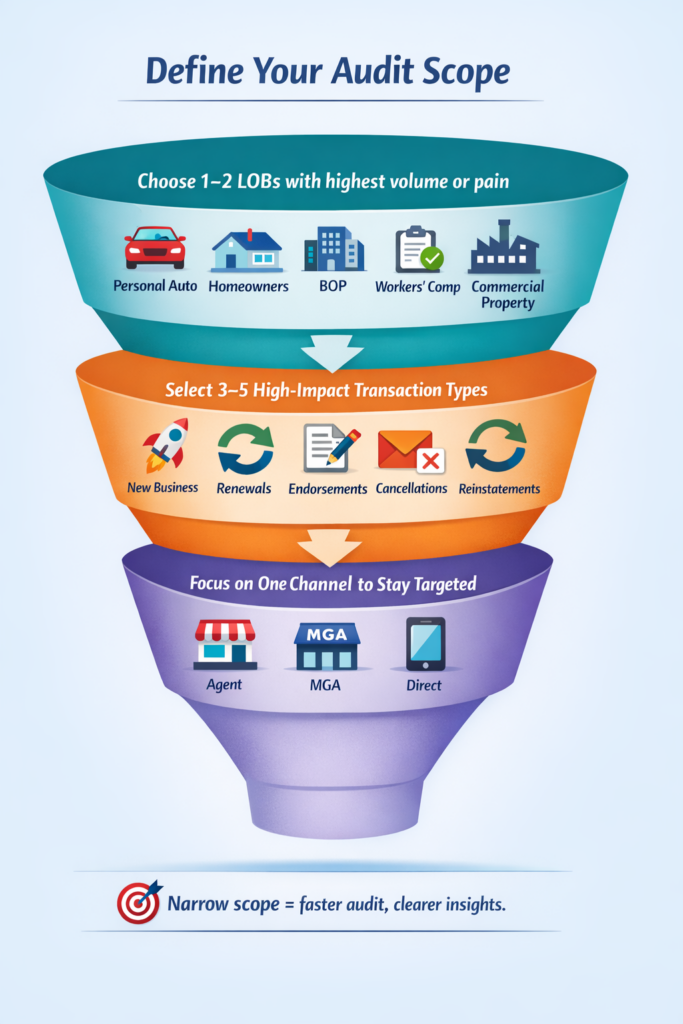
Keeping the audit scope tight is important because policy admin problems usually concentrate in a few transactions, not across the entire book. Choose one or two lines of business, such as Personal Auto, Homeowners, or BOP where operational friction or volume is highest. This helps isolate issues without overwhelming your team with complexity across products or states.
Next, pick 3-5 high-impact transaction types to audit like new business, endorsements, renewals, cancellations, or reinstatements. Limit the review to one distribution channel (agent, MGA, or direct) so you can finish the audit in one to two weeks with clear, actionable insights.
Step 2: Map All Systems, Integrations, and Handoffs in Your PAS
Next, map every system involved in the policy workflow and how work moves between them. Start with your core platforms, including the PAS, rating engine, billing system, document tools, CRM, and any workflow or imaging tools.
Then identify where data moves automatically and where teams rely on manual workarounds such as spreadsheets, shared inboxes, file exports, or email approvals. These gaps are often where delays, duplicate entry, and errors begin.
Finally, trace each handoff between teams such as underwriting, servicing, billing, and compliance. If a transaction touches 4+ systems or passes through 3+ teams, delays and errors are almost guaranteed. .
If a transaction touches multiple systems and teams before completion, your PAS audit will likely uncover workflow friction and integration gaps.
If this step reveals heavy reliance on disconnected systems and manual handoffs, it may be worth evaluating whether a more integrated PAS platform, such as Practo Insura’s Policy Administration Software, could reduce operational friction.
Step 3: Map the Real Workflow
Start with 10 real policy files and trace each from start to finish.
- Where intake happens (portal, phone, email)
- Where data is entered
- Where approvals or exceptions are handled
- When docs are generated and by whom
- Where the process stalls
This helps surface hidden inefficiencies that don’t show up in reports. Capture when documents were generated, who triggered them, and where the process slowed down or paused. SOPs often miss these friction points, but real-life samples reveal the true workflow, and where rework or delays are silently piling up.
Step 4: Measure Key PAS Audit Metrics
To truly understand where delays and errors happen, you need to measure what’s going on. Start by tracking these 8 baseline metrics for each transaction type.
- Cycle Time – The total time from transaction intake to completion. Long cycle times often signal approval delays, missing data, or doc generation issues.
- Touches per Transaction – The number of handoffs or manual steps a transaction goes through. More touches usually mean more complexity, delays, and risk of rework.
- Rework Rate – The percentage of transactions that require corrections, resubmissions, or reissued documents. High rework is a clear sign of poor intake quality or missing rules.
- Exception Rate – How often transactions fall out of the standard processing path. Exceptions create manual work and indicate gaps in automation or rule coverage.
- First-Time-Right Documents – The percentage of transactions where documents were issued correctly the first time, with no fixes needed. This ties directly to compliance and customer trust.
- Override Frequency – How often underwriters or team members bypass system rules. Frequent overrides can point to flawed configurations or products not aligned with real-world scenarios.
- Backlog Aging – The number of open items grouped by how long they’ve been sitting. A growing backlog signals process breakdowns and bottlenecks.
- Compliance Defect Rate – The number of transactions with missing notices, incorrect forms, or invalid timing. This is critical in regulated lines and high-risk states.
Even with partial data, these will reveal hidden pain points and improvement opportunities. If these metrics are difficult to track or require manual effort, it often indicates limited visibility within your PAS and a need for better workflow and reporting capabilities.
Step 5: Tag and Categorize Audit Issues
To fix your policy admin process, you need to track not just what went wrong but why. Tagging each issue by type helps you see patterns, assign root causes, and prioritize what to fix first.
- Data Quality – Missing or mismatched fields (like garaging address or insured name) cause rework, rating errors, and downstream doc issues.
- Rating / Version – Using the wrong version or frequent overrides often signals outdated rules or SERFF misalignment.
- Forms / Docs – Incorrect or late documents, such as outdated declaration pages or missing state forms, can lead to compliance violations.
- Workflow – Stalled queues or unclear ownership often cause silent delays and force teams to escalate or work outside the system.
- Billing – Errors like wrong proration, fee mismatches, or missed reinstatement syncs stem from poor PAS-billing coordination.
- Compliance – Late or missing notices, wrong form editions, or no delivery proof pose regulatory risk, especially in states like California (Prop 103).
Tracking these defects helps separate small inefficiencies from high-risk issues, and ensures your fixes reduce both rework and regulatory exposure.
Step 6: Score Your PAS Audit Maturity
Once you have identified defects and measured key metrics, the next step is to assess how mature your policy administration process is across the areas that matter most. A simple maturity score helps you compare strengths and weaknesses, visualize gaps, and decide where improvement efforts should start.
Use a 1-5 scale to rate your current state across core dimensions such as process clarity, automation coverage, data integrity, document control, compliance resilience, and change readiness. This makes it easier to move from observations to priorities, especially when multiple teams are involved.
- Process Clarity: Are the steps clearly defined, consistently followed, and assigned to specific owners?
- Automation Coverage: Are routing, validations, and decisions rule-based, or do they depend on people to catch things?
- Data Integrity: Is there one source of truth for policy data, or do users re-enter info across systems?
- Document Control: Are forms issued with the right version, timing, and audit trail?
- Compliance Resilience: Can you prove that required notices, approvals, and overrides were completed and documented?
- Change Readiness: Can you roll out rate/form changes without breaking workflows or triggering confusion?
Sample Heatmap (for Auto Endorsements)
| Category | Score (1-5) | Notes |
|---|---|---|
| Process Clarity | 2 | Steps vary by representation, no shared checklist |
| Automation Coverage | 1 | Manual routing and approvals for nearly all changes |
| Data Integrity | 2 | Re-keying in PAS and billing system |
| Document Control | 3 | Some automation, but forms often corrected manually |
| Compliance Resilience | 2 | Delivery evidence and overrides not consistently logged |
| Change Readiness | 1 | Rate updates cause downstream issues in billing/docs |
Tip: Start fixing the areas where your score is 1 or 2. You’ll get the biggest impact with the lowest resistance and build momentum for broader changes.
Step 7: Prioritize Fixes Based on Impact and Effort
Once you’ve mapped your issues, scored your maturity, and measured your metrics, it’s time to act. But not everything needs a full-scale project. Sort fixes into Quick Wins, Medium-Term Improvements, and Strategic Initiatives based on how hard they are to implement vs. the value they’ll deliver.
A smart prioritization prevents teams from getting stuck in analysis or chasing low-impact fixes first.
Quick Wins (2-6 weeks)
These are low-effort changes that can be implemented by operations or product teams without system overhaul.
- Mandatory Field Validations: Add rules to prevent incomplete or inconsistent data at intake (e.g., missing driver info or vehicle use).
- Queue Assignments and Routing Rules: Standardize who handles what, no more bouncing between inboxes or shared folders.
- Doc Trigger Timing: Shift document generation earlier in the process to avoid last-minute errors or corrections.
Why it matters: These fixes reduce rework and cycle time fast and build confidence across teams.
Related Read: How to Enter New P&C Markets Without a Core Overhaul
Medium-Term Fixes (6-12 weeks)
These need some cross-functional effort or minor configuration but are achievable without a full system redesign.
- Rules-Based Triage: Automatically assign work based on type, geography, or LOB to reduce backlog and manual routing.
- Renewal Automation: Apply rules to auto-process clean renewals (e.g., no MVR change, no claims), increasing Straight-Through Processing rates.
- Approval Capture Updates: Move approvals and exception logging out of email and into your core system, with full audit trail.
Why it matters: These fixes increase consistency and visibility while freeing up capacity for complex cases.
Strategic Initiatives (90+ days)
These require significant IT involvement, vendor coordination, or budget, but solve core system or integration pain.
- PAS Configuration Redesign: Rebuild outdated workflows, endorsement types, or rating logic that no longer serve your product needs.
- Event-Driven Integrations: Replace batch file transfers or manual triggers with real-time data sync across PAS, billing, and forms.
- Workflow Engine Upgrades: Implement or modernize tools that support dynamic routing, SLAs, and task visibility across teams.
Why it matters: Strategic fixes unlock long-term agility, especially if you’re expanding to new products or states.
Attach each fix to a KPI improvement (e.g., reduce endorsement cycle time by 2 days, cut rework rate by 20%). This helps you track ROI and build a case for ongoing optimization.
3 Thing to Do After a Policy Administration System (PAS) Audit
1. Align the Team on Priorities and One Metric
Once your audit findings are in, first, align your team on what matters most. Share a simple summary: the top issue you uncovered (e.g., delays in endorsement processing), the most common defect type (e.g., missing approval evidence), and one clear metric to improve (like reducing endorsement cycle time by 20%).
This gives your team a shared target and avoids scattered efforts. Keeping the focus tight builds early momentum and makes success measurable.
2. Turn Audit Findings into an Action Plan
Turn your audit findings into an actionable improvement plan. Start by grouping the fixes into clear categories so teams know where they fit and what they’re solving for.
Assign each fix an owner and a realistic deadline. Begin with quick wins that can be delivered in 2-6 weeks to build momentum and show immediate impact. Then phase in medium and strategic fixes based on effort and dependency.
A roadmap grounded in real audit evidence, keeps teams focused, accountable, and aligned with business priorities.
3. Create a Dashboard to Track KPIs
Build a simple dashboard using the 8 baseline metrics from your audit: cycle time, touches, rework, exceptions, doc accuracy, override rate, backlog aging, and compliance defects. Even a basic Excel or BI tool setup works if it gives visibility.
Update the dashboard weekly or biweekly so teams can spot trends early and adjust. Highlight any spikes in exception rate, rework, or backlog, which often signal workflow breakdowns, product rule gaps, or upcoming compliance risk.
Related Read: Top 10 Policy Administration Systems in P&C Insurance
When to Consider External Support for Your PAS
While many fixes uncovered in your audit can be handled internally, some challenges point to deeper structural issues that need outside support. Knowing when to bring in an expert strategic insurance consulting partner like Practo Insura can help save time, reduce risk, and prevent your team from patching over problems that need strategic change.
- Repeat compliance defects tied to state rules: If you’re consistently missing notice timing or form requirements (e.g., Prop 103 in California), the risk is too high to manage with patchwork fixes.
- You can’t measure key performance metrics: When systems are fragmented and data is scattered, you lose visibility and that makes both improvement and compliance nearly impossible.
- Your PAS needs workarounds for every product change: If launching new products or states requires manual overrides and config debt, it’s time to rethink your platform strategy.
- Exception handling is mostly manual: When approvals and corrections happen over email, not in-system, you’re exposed to audit gaps and operational slowdowns.
- Expansion plans will strain your workflows: If your current process can’t keep up today, adding more states or products will only magnify the problems.
Conclusion
A focused Policy Administration System (PAS) audit gives insurance teams clear visibility into how policies actually move across systems, workflows, and compliance requirements. It helps identify where delays, errors, and risks are building, and which changes will have the biggest operational impact.
By defining a clear scope, mapping workflows, measuring key metrics, and prioritizing fixes, your team can improve efficiency and reduce compliance exposure without starting with a full system overhaul. Even a simple audit can uncover gaps that are not visible through reports or day-to-day operations.
However, an audit alone does not resolve deeper system limitations. If issues are tied to outdated configurations, fragmented workflows, or lack of integration across systems, a more structured approach to policy administration may be required.
In such cases, solutions like Practo Insura’s cloud-based Policy Administration Software can help streamline workflows, improve visibility, and support scalable policy operations across products and states.

We specialize in developing innovative Property & Casualty (P&C) insurance software solutions, leveraging over 8 years of InsurTech expertise to simplify insurance operations and enhance efficiency.
Share Article via


Subscribe to our insights newsletter
Related Blog Posts

How to Reduce FNOL Time...
 05 Oct, 2026
A homeowner discovers a burst pipe at 11 p.m. If...
Read More

Top 9 Claims Estimator Solutions...
23 Sep, 2026
Claims estimating can involve significant manual work, from reviewing damage...
Read More

7 Signs Your P&C Insurance...
14 Aug, 2026
For U.S. P&C insurers, AI is shifting from a technology...
Read More